
Every fact has a home
Put a sighting, character, place or faction where the rest of the world can find it.
 Narrative Foundry
Story planning / linked lore / shared worlds
Story planning and linked lore for writers, game worldbuilders and teams. Keep scenes, factions, claims and consequences connected on a server you control. Build a novel, campaign or game world with a shared record of what happens, who knows it and why it matters.
Generic worked examples Follow a character, a disputed account and a scene through the workflow. Names and story details are invented to demonstrate the product.
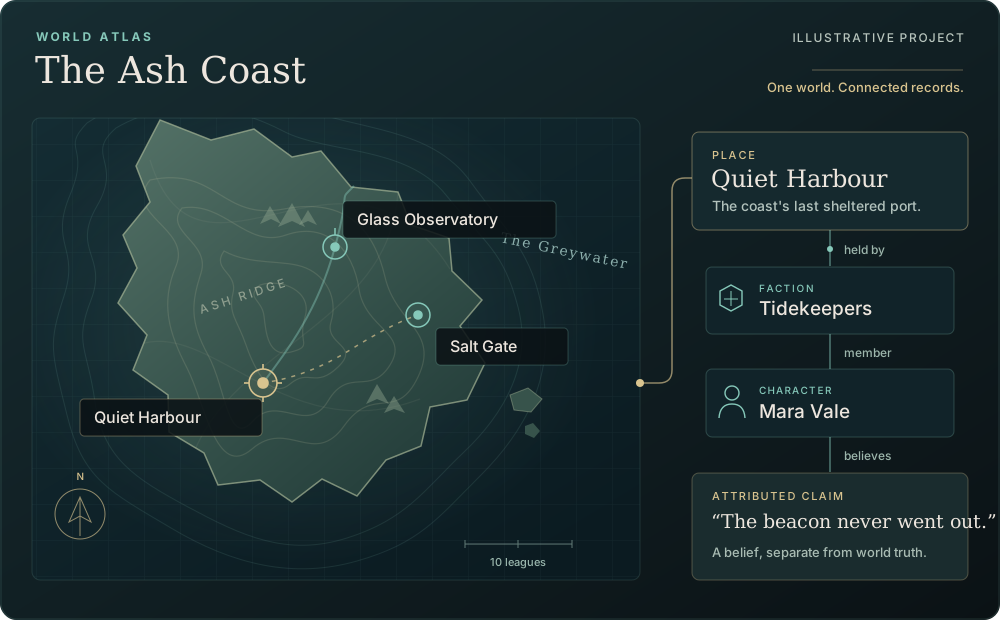
Put a sighting, character, place or faction where the rest of the world can find it.
Keep evidence, confidence and perspective beside the claim instead of burying them in prose.
See the scenes, maps, notes and decisions a changed fact can affect before you rewrite.
Move approved narrative onward through dialogue, review, translation, reader editions and handoff.
Generic worldbuilding examples
Start with a character, a place, a faction and a scene. Link their records, attach sources to disputed details and review what changes as the story develops.
Four connected records
CHARACTER
A harbour keeper with a role, relationships and a limited view of events. Keep what she believes separate from what the shared world record establishes.
FACTION
A local guild with its own aims and history. Link members and relationships to the same record so changes remain easy to trace.
PLACE
A location shared by several scenes. Pin its existing record on a map while keeping descriptions, sources and revisions together.
SCENE
A departure depends on what the characters know about the harbour beacon. Link the scene to the people, place and claims it uses.
The Narrative Foundry difference
Worldbuilding becomes durable when a sighting, its source, its review and its consequences stay linked—even when the final answer is still unknown.
ACCOUNT
Mara says the harbour beacon stayed lit through the night. Record her account without deciding that her memory is the whole story.
CLAIM
Keep the words, the speaker and the confidence beside the claim. A harbour ledger provides a second account to compare.
REVIEW
Writers can compare the claim with other scenes and sources, then keep it unresolved, refine it or reject it without erasing its history.
CANON
A deliberate approval preserves a version of the world while later drafts keep moving. The record shows the difference.
Open the case file
These generic examples show a shared setting, an attributed claim, a character record and the work affected by a revision.
Illustrative story example
A world record starts with shared places, people and events. It gives a writing team a common frame while leaving room for different character perspectives.
One shared setting can hold several different accounts.
SHARED FOUNDATION
A harbour town, a local guild and a departure that brings their stories together.
Illustrative story example
A claim ledger keeps the sentence, the source and the review state together. It stops an evocative line in a scene from quietly turning into a universal rule.
A witness can be believable without being definitive.
Illustrative story example
Mara Vale is an invented harbour keeper. Her record holds her role, guild and scene links, while her account of the beacon remains a claim to review against a separate source.
A character record can hold a belief without making it world truth.
Illustrative story example
When an observation changes, the useful question is not only “what is true now?” It is also “where did the old assumption travel?” Linked records make the affected work visible before a rewrite lands.
Continuity becomes a traceable decision, not a scavenger hunt.
How to read this case study: all names, places, claims and events are invented to demonstrate Narrative Foundry’s workflow. Use the same record types for your own setting.
Interactive worked example
A writer has a character and two conflicting accounts. Create the record, add its context, attach the sources and trace the scenes that need review.
Shared context
Characters, places, factions and scenes stay connected.A character’s account keeps its source and review state beside it.
Illustrative workflow
The character, harbour and source accounts are invented.They show how records connect in a generic story project.
Hosted 0.32.0 pilot
Linked records, claims, reviews and revisions.The interaction below is a pre-filled demonstration, not a live editor.
What this can turn into
One world, many ways to work
Narrative Foundry is for teams that need the story, the evidence behind it and the work that follows to stay in conversation.
Give each faction a shared record for its aims, members, history and relationships. Link the scenes that depend on them so changes are easier to follow.
Build quests and dialogue as inspectable graphs, declare state and test bounded routes before handing a read-only story package onward.
Separate what the world record establishes from what a character, faction or party knows at a point in the story.
Hold scenes, books, notes, sources and world chronology together when the story grows beyond one document or one person.
Use saved revisions, exact-passage comments, comparison and approved canon copies to let a team change the work deliberately.
Prepare translations, short line recordings, reader editions and explicit exports while retaining a clear account of what each output carries.
Keep rival accounts, incomplete evidence and later revelations connected without forcing a temporary answer into the shared world record.
Record a disputed allegiance or unexpected event as a claim, with sources and review beside the established world record.
Use linked records and backlinks to find the scenes, notes and maps that refer to a changing fact, then decide what needs attention.
The story planning workspace
The examples above are illustrative. These six workstations describe the private 0.32.0 pilot. Its Creative Studio brings Plan, Write, World and Review together, with grouped tools and deliberate saves. Newer verified visual tools are awaiting rollout.
Story planning / illustrative example
Arrange scenes across narratives, plot lanes and beats. Follow a character from a harbour meeting to a ferry departure, filter by faction or source, then reorder stacked cards without changing the reading outline.
Plot order, reading order and world time each have room to be different.
Mara reached the quay with a sealed letter and a question about the beacon. The ferry was already taking its last passengers.
The harbour ledger told a different story from the one she remembered.
Build visual timelines and outlines with axis and density controls. Keep parallel threads readable, even when scenes share a beat or stack in the same place.
Write longer work in nested chapters, including screenplay documents. Focus and Paper views keep the ordinary prose editor and unsaved text intact. Format scene and lore prose, inspect explicitly linked saved references, and map chapters by hand to dialogue lines and actions before reviewing a one-way conversion.
Catch a thought or source in the notes inbox, then review its conversion into a scene or lore. Plan books across a series and give them image covers.
Author world chronology separately from the reading outline. Historical events, relationships and what a character learns can change at different points in the story.
Field schemas apply to scene and lore records, not user-defined record types. Build them from shared property groups with defaults, read-only field policies, ordered typed links and bounded read-only collections; review migrations before a schema change applies. Constrained narrative expressions offer completion, highlighting and diagnostics rather than general-purpose code. Versioned templates and reviewed project designs carry a good setup forward.
Keep author preferences with import and safe reset flows. The grouped tool catalogue adds task search, activity filters and temporary pins for the current sign-in. These controls organise the workspace without changing the story.
Worldbuilding / illustrative records
Start with your setting, then link characters, places and factions to the scenes that depend on them. Each claim can carry its source and perspective, so a character’s belief stays distinct from world truth.
A place belongs in the world once. The map only points to it.
Connect characters, places and factions to the scenes that depend on them. Typed historical relationships change over time rather than being overwritten by the latest version.
Pin existing places on versioned maps without copying their lore. Draw layered floor plans as vector shapes. Place factions across Order, Change and Harmony, with Creation and Destruction on a separate axis.
Attach managed PNG and JPEG images, UTF-8 text and PDF files. Entities can have avatars and display styles; small WAV clips and silent WebM video are managed as media where they belong.
Use a bounded typed query builder and save shared or personal views. Find a chapter by its saved title within the selected document, with ancestor context and the full outline retained. Folders, favourites, split panes, a pinned inspector and searchable pickers keep linked work within reach.
Reusable project designs carry reviewed schemas, shared groups and templates into a new story. The team can build a stable base before writing starts.
Relationships, perspectives and chronology are authored records. Narrative Foundry does not infer a secret world model behind the work or decide which account of the world is correct.
A concrete record, from first note to linked lore
Start a lore entity, give it a useful shape, attach the claim that makes it unusual, then connect it to the scenes and people that need to know about it.
A record can hold an exception without rewriting the whole world.
CHARACTER · INVENTED EXAMPLE
An invented harbour keeper whose account of the beacon differs from the harbour ledger. The claim remains open for review.
“The beacon never went out.”
Character account · made-up exampleChoose a character or entity record, then name it before writing a page of prose. Here, the new record is Mara Vale.
Link the Tidekeepers faction and Quiet Harbour, then add a clear role and useful tags: harbour keeper, witness and draft.
Save the character’s account as an unverified claim. Attach the harbour ledger as a contrasting source and leave the conclusion for review.
Link the entity to the scene and source that introduced it. A later writer sees the backlinks, revises the draft and only then takes it through review.
Use shared property groups and typed links to keep a repeatable entity record. The schema still belongs to a scene or lore record; it does not create a new database type for every character.
Mara’s account of the beacon is a claim to verify. Source, perspective and review state let the next writer compare it with the harbour ledger.
Scenes, factions, notes and related entities can point back to the same record, so a later change is easier to find before it surprises the story.
For stories people can play
Build quests and conversations as graphs with nested sections, reusable speakers and dialogue templates. Give a party typed state, add conditions and effects, then test declared routes through a bounded playthrough.
A branch is something you can inspect, test and hand over.
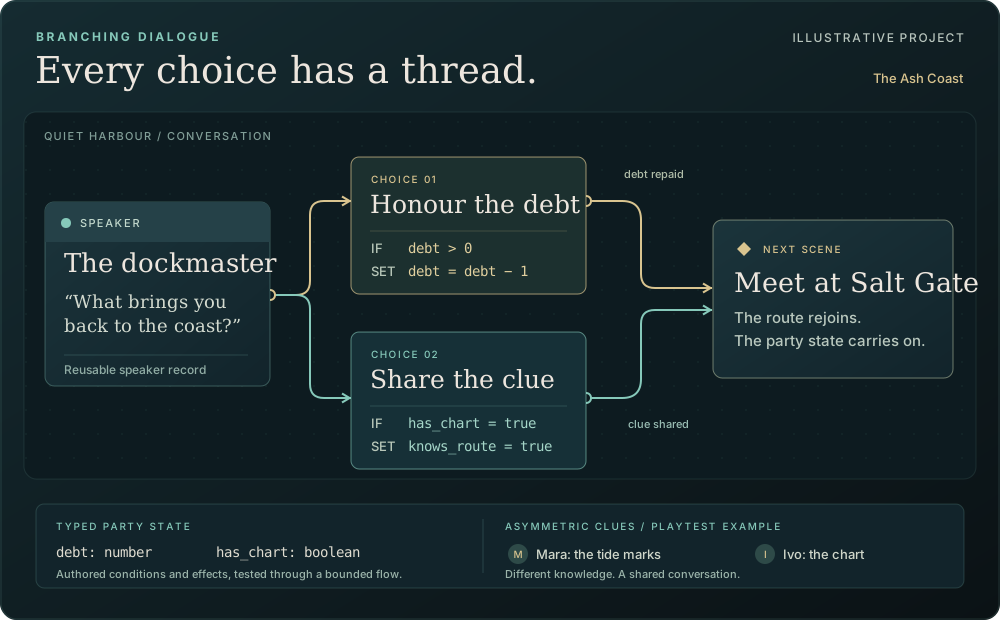
Build nested quest and dialogue structures with reusable speakers and dialogue templates. Choice templates are not part of the current pilot, so each choice stays an authored part of its own flow.
Declare typed party state, then use it to gate a route or change it as an outcome. Conditions and effects sit with the authored branch instead of hiding in prose.
Play selected routes through the graph, including declared co-op choices and clues split between players. A completed route helps inspect the flow; it does not prove every possible route is sound.
Authors can map a chapter by hand to actions and dialogue lines and preview a one-way conversion. Narrative Foundry does not parse a screenplay into flow in the pilot.
Prepare spoiler-safe reader editions from the same world. They default to no material, then expose selected approved material to edition-local, revocable reader identities; readers do not become project members.
A versioned read-only narrative handoff can be made for other tools. It installs nothing into a game and does not change a connected project.
A shared world needs a record of change
Saved revisions, comments and explicit approval keep an active project legible. An Owner can approve an immutable copy of a saved revision as canon while the writing continues.
The answer to “when did this change?” is in the project, not in somebody's memory.
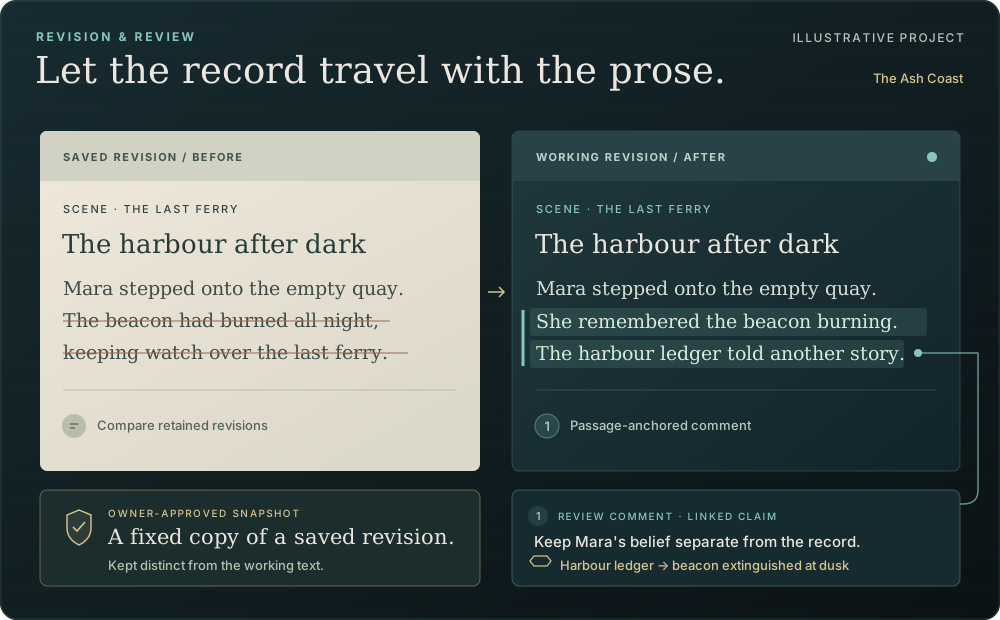
Owner, Editor and Viewer roles make responsibility clear. Editing uses explicit saves, with saved revisions and conflict review rather than silent merges.
Keep the latest 100 saved revisions and restore one as a new revision. Compare retained revisions or approved snapshots, anchor comments to an exact passage and work through a review inbox.
Deterministic continuity warnings explain why they fired and keep recorded waivers. Project-wide diagnostics help find incomplete or inconsistent records; they do not decide creative truth.
Teams can prepare batches of existing-field edits to projects, scenes, entities and notes. A batch can be prepared while disconnected after starting online, then is rechecked when it saves.
Archive a whole project or move records to recoverable Trash. Optional encrypted browser autosave stores passphrase-protected snapshots of most unsent drafts; it cannot guarantee a save after a crash or protect an unlocked page.
An Owner can purge a supported, directly trashed record or a canon-free archived project after scope review, exact-name confirmation and acknowledgement. Approved canon blocks purge. Account deactivation follows an explicit lifecycle, while administrator readiness checks keep operational state visible.
Operator-reviewed extensions are inert and data-only: they add settings and commands through a Project extensions panel, without arbitrary plugin code. Only the host's built-in plain-notes format can register in the normal Import and Export wizards. Scoped machine identities can be revoked by an administrator, and an offline starter kit supports package work.
Project ownership, roles, review and approval apply before material becomes canon. Optional AI tools are present but their services remain off. Selected results need a person’s review and save; approved canon is never an AI target.
Bring the story to its readers and collaborators
Choose project languages, work through translations, attach short line recordings and prepare reader editions. When material leaves the workspace, the export describes what it can and cannot carry.
The file gets a clear account of what made the journey.
| Source | Translation | Review |
|---|---|---|
| RECORDER 04The signal is not for us. | RECORDER 04Le signal ne nous est pas destiné. | Reviewed |
| RELAY TECHThen who is it for? | RELAY TECHAlors, à qui est-il destiné ? | Ready |
Choose project languages, translate selected material and use spelling checks with operator-installed dictionaries plus per-language lists of invented words. Translation glossaries are not implied by those word lists.
Attach short WAV recordings to individual lines and locales, then exchange recording scripts and return selected work. The pilot supports up to 25 locales and 1,000 captured lines under the same media caps and ordinary review.
Import and export native JSON, then export Markdown, RTF, OPML and a linear DOCX reading copy of a selected branching flow. RTF and OPML can carry selected saved documents or complete top-level chapter branches in authored order. Every output reports its known omissions.
Use typed XML, typed spreadsheet export with safe reimport, saved export rulesets that can assemble dependency-closed packages, and a versioned read-only narrative handoff. These outputs preserve selected data; they do not install or run inside another tool.
Preview the supported RTF text subset or selected OPML outlines, then acknowledge the complete text and loss report. Create a separate unapproved workspace, append a new reference document to the current workspace, or add chapters to an explicitly selected saved document.
Export a selected saved flow or map version as an XPS vector document, with retained map layers and an omissions report. Labels are drawn shapes rather than searchable text; unsupported glyphs block the export. Map images are omitted, and oversized exports are refused.
Inspect a supported .fdx screenplay of up to 500 paragraphs and import chosen headings, action, character cues, dialogue and parentheticals into a screenplay document, retaining the original and loss report. A title page or unsupported paragraph kind refuses the file; styles are dropped.
A separate conversion review can map up to 100 selected paragraphs to a straight-line flow using actions and existing saved speakers. It does not infer speakers, choices or branches.
Native copies omit actual attachment bytes and approval authority; a full installation backup is separate. DOCX and RTF have not been checked in desktop word processors, and Narrative Foundry does not promise lossless third-party round trips.
Native JSONMarkdownRTFOPML 2.0DOCX reading copyTyped XMLSpreadsheetsRead-only handoffXPS diagramsControlled .fdx import
Tabs work without scripts: choose a section to keep the page focused, or use your keyboard to move between the radio controls.
Hosted tools / services disabled
The 0.32 pilot includes these desks and reviewed draft workflows. Its AI services remain off, and its desk checks used simulated responses. A separate private profile has now passed an isolated live test.
Before an optional AI service drafts material, a request desk shows the saved passages selected, where they would go and the estimated cost. Each request is reviewed, then confirmed once; usage and budgets stay on record.
A charge the server cannot confirm stays marked unknown until an Owner reconciles it.
Off until an operator connects a service and an Owner sets a policy. Live use remains unverified.
An optional AI service drafts answers from selected saved passages. Statements quote their sources, interpretations are flagged unverified and it is told to say “not established” where the passages do not cover the question.
A lens can limit context to what one character, faction or party knows, with reveal and acquisition cutoffs. It uses keyword search over selected passages, not semantic search or a reading of the whole world. A cited answer does not establish truth or approve canon.
Off until an operator connects a service and an Owner sets a policy. Live use remains unverified.
An optional AI service drafts possible continuity concerns against selected passages. Each concern must cite at least two separate, non-overlapping passages and explain its reasoning, uncertainty and alternatives.
The result is advice, not a verdict. It remains separate from the deterministic continuity warnings already in the pilot.
Off until an operator connects a service and an Owner sets a policy. Live use remains unverified.
An optional AI service drafts suggestions for a retcon request. Its report compares the current revision with an earlier revision still retained in History, and follows saved links to and from the 1–24 records you pick.
It will not catch every consequence and rewrites nothing. You choose any follow-up work.
Off until an operator connects a service and an Owner sets a policy. Live use remains unverified.
An optional AI service drafts alternative lines against a versioned character voice profile, using the saved context you choose.
Only current draft dialogue can change. Approved scenes cannot be targets, and the software does not certify that a line sounds right for the character or performer.
Off until an operator connects a service and an Owner sets a policy. Live use remains unverified.
An optional AI service drafts short bark packs for a situation and selected speakers, with counts, placeholders, forbidden terms and variation constraints.
Only lines you select become draft dialogue nodes. They have no automatic triggers, connected routes or generated audio.
Off until an operator connects a service and an Owner sets a policy. Live use remains unverified.
An optional AI service drafts up to four versions of a branch or co-op test scenario. Declared routes, participants and voting choices can be replayed through the existing bounded playtest.
Coverage and inconclusive outcomes remain visible; this does not prove every route is reachable or rule out every deadlock.
Off until an operator connects a service and an Owner sets a policy. Live use remains unverified.
An optional AI service drafts translations against selected saved lines, source evidence, a glossary and style guidance. Checks flag literal placeholders, tags and terms.
Only selected draft rows are kept. Final translation status and cultural judgement remain with people.
Off until an operator connects a service and an Owner sets a policy. Live use remains unverified.
An optional AI service drafts up to four sets of characters, places, factions, claims and relationships from selected references.
New claims start with their truth unknown. A name collision is refused rather than overwritten, and proposed material is reviewed before it becomes ordinary editable draft records.
Off until an operator connects a service and an Owner sets a policy. Live use remains unverified.
An optional AI service drafts scene, character, handoff or retained-revision summaries from selected saved passages. Factual statements quote sources; interpretations, proposals, unknowns and omissions are labelled separately.
Comparisons need the earlier revision still in History. Citations do not make a summary complete or approved.
Off until an operator connects a service and an Owner sets a policy. Live use remains unverified.
An optional AI service drafts a concept image from reviewed text and references, with destination, settings and rights information shown before a request.
Only inspected PNG or JPEG results you select are kept as draft attachments. The connection is switched off; live availability, artist rights and image quality have not been verified.
Off until an operator connects a service and an Owner sets a policy. Live use remains unverified.
An optional AI service drafts speech for chosen lines using its built-in voices, with reviewed character and language mappings. There is no voice cloning.
Results must be valid WAV files. Audition and selection are separate steps before chosen drafts attach to the project.
Off until an operator connects a service and an Owner sets a policy. Live use remains unverified.
Keep versioned team prompts, style guides and reusable briefs for how an optional AI service drafts. Each request is bound to the version that was reviewed.
Changes and rollback are explicit. An evaluation record does not certify creative quality or turn a service on.
Off until an operator connects a service and an Owner sets a policy. Live use remains unverified.
A workbench gathers an optional AI service’s world drafts and cited summaries, with links to evidence, writing, translation, media and costs.
It shows selected and omitted context, perspective, destination, limits and cost estimates before a send. Results wait for your selection and save.
Off until an operator connects a service and an Owner sets a policy. Live use remains unverified.
Synthetic scenarios check how an optional AI service would draft against evidence, access rules, refusals and reviewed saves, including failed and inconclusive outcomes.
These use simulated responses. They do not establish literary quality, semantic accuracy, translation quality or the suitability of a voice or image.
Off until an operator connects a service and an Owner sets a policy. Live use remains unverified.
Access, collaboration and portability
Use the workspace for a novel, a campaign, a game world or a shared story bible. The examples use invented records to show how the parts connect.
Read the current availability →The hosted 0.32.0 pilot is limited to our internal team. There is no public signup, download or source release yet. The controls on this page reveal pre-filled examples; they do not create an account or save a project.
Yes. The pilot supports scenes, characters, places, factions, notes and relationships for your own setting. Custom fields and versioned templates let a team organise its records. The examples on this page are invented to demonstrate the workflow.
No. Timelines, linked lore, sourced claims, review and exports work without one. The hosted software includes optional AI tools, but no service is enabled. They require an operator connection and an Owner policy; checks have used simulated responses, and live service quality remains unverified. Results are drafts for a person to review and save.
The pilot has Owner, Editor and Viewer roles, saved revisions, passage comments and review. Edits use explicit saves, and conflicting revisions need review. Team editing supports reviewed batches of existing-field changes; it does not provide live shared typing or general offline authoring.
Native JSON supports import and export. Controlled RTF and OPML import previews supported text, selected outlines and losses before an explicit save. Choose a new workspace, a new reference document in the current workspace or an existing saved document. OPML can retain selected nested chapters; its separate Inbox-notes mapping remains available.
Readable exports include Markdown, RTF, OPML and a DOCX reading copy of a selected branching flow. RTF and OPML also support complete selected chapter branches. Known omissions are reported. Native copies leave out attachment bytes and approval authority, so a full installation backup is separate. Desktop word-processor fidelity remains unverified.
The current handoff is a versioned, read-only data package. It installs nothing into an engine. The isolated Unreal sample now has bounded runtime and packaged-media acceptance. Other platforms, multiplayer and adoption in an existing game remain separate. Unity work is cancelled.
Newer work and what comes next
The hosted pilot is version 0.32.0. Newer visual tools have passed their candidate checks, with rollout still ahead. Spatial authoring and character dossiers are in development.
The internal team uses Creative Studio for planning, writing, worldbuilding, branching stories, review and translation, with reviewed writer interchange.
HOSTED VERSION 0.32.0Storyboards, connection maps, contextual world records and passage-based review have passed candidate checks. They are awaiting a pilot rollout.
VERIFIED CANDIDATE / NOT HOSTED YETA navigable story field, character sheets and cast comparison are being built around the existing records, editors and saved revisions.
IMPLEMENTATION AND ACCEPTANCE UNDER WAYSwitch between cards and an outline of saved chapters and scenes. Filter the selected scope, read summaries and open the existing editor for the exact record.
Connections use actual saved links. Moving the view leaves authored order alone; changes to story order still need an explicit move and save.
Keep a selected record and its pinned context while moving between planning, writing, World and Review. Open its saved references and return to the same selection.
Local drafts, editing focus and conflict review stay with the existing editor.
Search for a saved record, focus its neighbourhood and inspect labelled incoming and outgoing relationships. A corresponding link list provides another way to explore the same scope.
Browsing or arranging a map does not create a relationship. The view shows authored links and explains records outside the current scope.
Navigate a branch graph with selection, zoom and fit controls, inspect a node beside the graph and switch to an ordered list on small screens.
An explicit preview shows the nodes, choices and state changes from the traversal that actually ran. Viewing the graph does not execute it.
Browse existing world records as cards or a list, using managed images and readable fallbacks. Inspect authored relationships and linked map features from the selected record.
Atlas places selected feature details and layer controls beside the map, with a detail view on phones and explicit saves for geometry changes.
Filter review issues and open the exact saved passage, source field and revision beside each one. Open the editor and return to the same issue.
A changed or removed passage is marked stale for review. The software does not guess a new anchor or confuse resolving a comment with approving canon.
Optional AI desks show brief, source, operation, review and selected-save stages. Service state, selected context and the decision to save stay visible where they matter.
Contextual help and an optional sample walkthrough explain the visual tools. Hosted AI services remain off, and the walkthrough does not seed a real project.
An isolated Unreal sample imports the versioned narrative handoff and exposes a Blueprint runtime, reviewed reimport, rollback and media handling. Its bounded Win64 checks include editor persistence, runtime callbacks and packaged-game media.
This sample was tested with Unreal Engine 5.8.3 in Development builds. Other engine versions, platforms, Shipping builds, multiplayer and adoption inside a real game remain unverified. The handoff installs nothing into an existing game.
A private text profile has passed an isolated live test on measured hardware, including its authenticated gateway and an explicitly reviewed save of a synthetic draft.
The test services were removed. The hosted pilot has no active AI service. Production activation is separate; broader workloads and subjective writing quality remain unverified.
Automated Windows browser checks cover keyboard authoring, focus, accessibility-tree labels, narrow layouts, native zoom, conflicting saves and retained drafts. Automated private-access and sign-in boundaries have also been checked.
Real screen-reader use, assistive devices, physical-device pairs, macOS/Safari, input methods and normal mapped-user VPN/MFA authoring remain deferred and unverified.
The Narrative Observatory explores continuous zoom across story records, with a minimap, selection tools, path focus and navigation history. Layout work includes directed graph and flow arrangements.
The renderer, scale, lifecycle and equivalent keyboard/list controls are still being verified. Optional depth views are an experiment, with a 2D alternative retained.
The Narrative Loom links scenes and character threads. Separate lenses explore saved references, mentions, traversal captures, Atlas locations and revision comparisons.
These views use authored records and captured evidence. Screen position does not establish story order, character knowledge or a relationship.
Readable character biographies, concise and detailed sheets, cast tables, side-by-side profiles and directed relationship matrices are being built over the existing records.
Missing facts stay missing. A different presentation does not create a second character or infer a reciprocal relationship.
Article-first views for characters, places, factions, items and concepts are being composed with pinned writing references, graph context and inspectors.
The existing editor retains ownership of the draft and explicit save while references change. These additions still need their remaining verification before release.
Isolated connector prototypes explore selected context from a work board and a knowledge store. A preview identifies the source, revision, passages and destination.
They remain disabled prototypes, without a live hosted integration. External text cannot grant editing or canon authority.
Isolated samples explore authored-content snapshots, record differences and managed or external repositories, with explicit conflict reports.
These are design samples, not a live repository connection in the pilot. Remote changes cannot silently replace current work.
Automated acceptance is complete for its stated scope. Screen-reader and assistive-device use, real device pairs, macOS/Safari, input methods and normal mapped-user VPN/MFA authoring still need actual observations.
Those checks remain deferred. Automated results do not stand in for a person using those environments.
Unity work is cancelled. Retained importer and editor source does not establish a working Unity integration; it has not run inside Unity.
There is no active Unity delivery commitment.
Verified source, isolated samples and research demonstrations have their own scope. The hosted pilot remains 0.32.0, with optional AI services off. No public release date has been announced.
Where it is today
Narrative Foundry is an independent ByteFoundry implementation developed around our own story and worldbuilding work. The current pilot runs on a server we control.
Public release details have not been announced. Source, licensing, installation instructions and release timing have not been published.